
Introducing Our Free AI Chatbot Plugin for WordPress
Help Your Visitors, Get More Results…
WP AI Chat adds an AI-powered chatbot to your WordPress website so visitors can ask questions and get useful answers based on the content already published on your site. It is designed to keep costs low while still delivering fast, relevant responses.

Why Add This AI Chatbot to Your Site?
WP AI Chat is built for WordPress site owners who want a practical, low-cost way to answer visitor questions, surface useful content, and improve the browsing experience.
Visitors don’t want to dig through pages to find answers. Our AI chatbot automatically retrieves the most relevant content from your site and presents it in an easy-to-read chat format.
Tailor the chatbot to match your brand and provide the right information to your users:
- Set a custom initial message to greet visitors.
- Add extra context to every query, such as details about your products or services.
- Modify appearance, including the chatbot’s title and color scheme.
- Adjust the display delay for a smooth, user-friendly transition.
- Choose whether the chatbot opens by default or waits for user interaction.
Unlike expensive AI chat solutions, WP AI Chat uses OpenAI’s low-cost GPT-4o-mini, keeping API costs minimal while still delivering high-quality responses.
To prevent abuse and control expenses, the plugin includes rate limiting by IP address. You can set limits on:
- Requests per minute
- Total requests per hour
This ensures fair usage and helps manage API costs effectively.
The plugin utilizes OpenAI embeddings to index and search through your site’s content quickly. This approach enhances chatbot responses, ensuring visitors receive highly relevant information without unnecessary delays.
Getting started is easy:
- Sign up for an OpenAI API account (required for generating responses).
- Fund your OpenAI account to cover API usage.
- Enter your OpenAI API key in the plugin settings to enable responses.
Once configured, the chatbot is ready to engage your visitors and improve their browsing experience.
Frequently Asked Questions (FAQ)
Common questions about installing, configuring, and using the free WP AI Chat plugin on a WordPress website.
Will this work with my theme? +
Yes! WP AI Chat is designed to work with all WordPress themes without breaking your layout.
Is this plugin really free? +
Yes! The plugin is completely free to install and use. However, you will need to fund your OpenAI API account to process queries.
Do I need an OpenAI API key? +
Yes. The chatbot uses OpenAI’s API to generate responses, so you must provide your own API key in the plugin settings.
What if I don’t have an OpenAI API key? +
Creating an OpenAI account is simple and free. You only pay for the API requests you use.
How does the chatbot find relevant answers? +
The plugin automatically retrieves the top five most relevant posts or pages from your site and passes them to OpenAI to generate a response based on your existing content.
Can I customize the chatbot’s appearance? +
Absolutely! You can change the chatbot’s title, color scheme, initial messages, and transition delays to match your website’s design and branding.
How does the rate limiting feature work? +
You can set restrictions on the number of requests allowed per minute and per hour, based on a visitor’s IP address. This helps prevent excessive usage and keeps costs under control.
Will this chatbot slow down my website? +
No. The chatbot uses OpenAI’s API for processing and OpenAI embeddings for fast searches, ensuring minimal impact on your site’s performance.
What if I don’t like it? +
There’s no risk! The plugin is completely free to install, try, and use.
Can I add extra information to chatbot responses? +
Yes! You can include additional context with each query, such as product details, service descriptions, or promotional messages, to enhance user interactions.
What happens if my OpenAI API credits run out? +
If your OpenAI API balance is depleted, the chatbot will no longer generate responses until additional funds are added.
How to Install WP AI Chat
If you have downloaded the WordPress AI Chat plugin as a ZIP file, follow these steps to install it manually:
Log Into WordPress
Go to your WordPress admin panel (yourwebsite.com/wp-admin).
Navigate to the Plugin Upload Section
In the left-hand menu, click on Plugins.
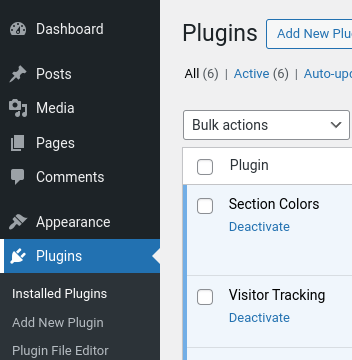
At the top of the page, click the Add New Plugin button.
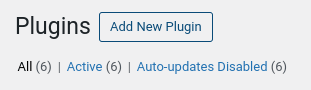
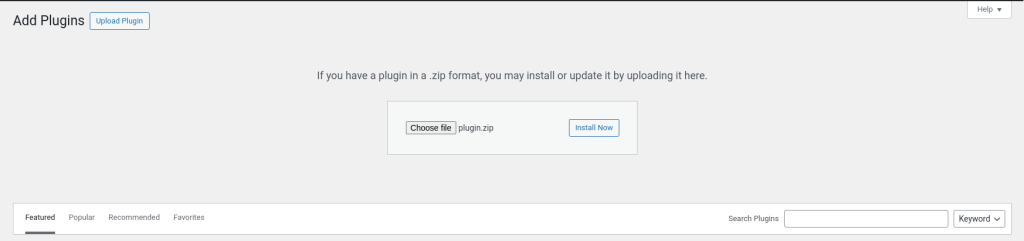
Click the Upload Plugin button.
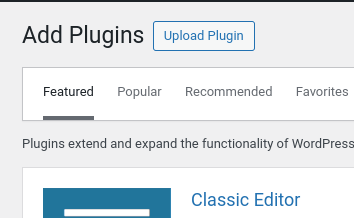
Upload the Plugin ZIP File
Click the Choose File button and select the downloaded plugin.zip file.
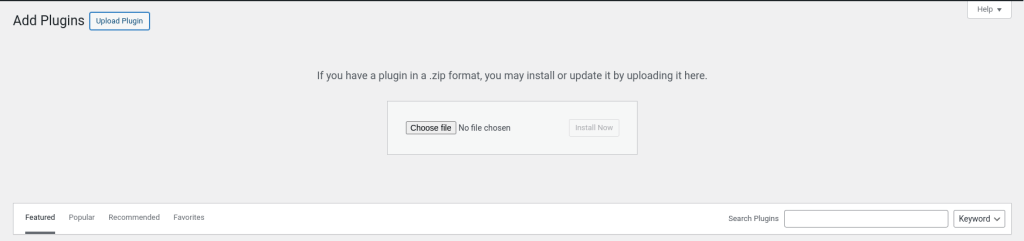
Click Install Now.
Activate the Plugin
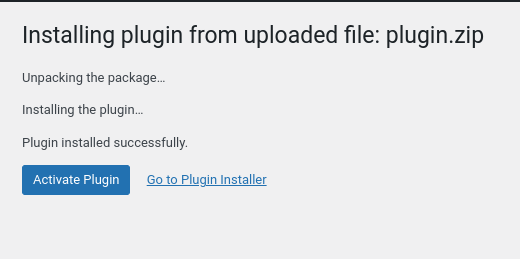
Once the installation is complete, click Activate Plugin.
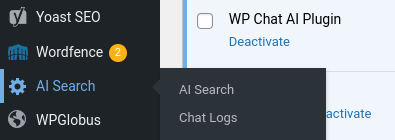
Go to AI Search in the left-side WordPress admin menu to adjust the chatbot settings as needed.
Your WordPress AI Chat plugin is now installed and ready to configure!
Get Started
Start engaging your visitors with AI-powered chat today! Download our free WordPress AI chatbot plugin and enhance your site’s user experience effortlessly.
Download WP AI Chat
Install the free plugin, enter your OpenAI API key, and start helping visitors find answers from your site content.
Need Any Help?
If you need any help getting the plugin installed, please contact us using the form below: